- Database Name: MyCircle, Table Name: Friends
- |ID|Name |Age|
| 1 |Nitin | 21 |
| 2 |Kaka | 22 |
| 3 |Ganesh| 20 |
- Synatx: delete from table_name [where expr..];
- delete from Friends where id=1;
- output:
| 2 |Kaka | 22 |
| 3 |Ganesh| 20 |
SQLite query for display result in descending order
Write the SQLite query for display result in descending order(Display the age column as a descending order query)
- Database Name: MyCircle, Table Name: Friends
- |ID|Name |Age|
| 1 |Nitin | 21 |
| 2 |Kaka | 22 |
| 3 |Ganesh| 20 |
| 4 |Sama | 18 |
| 5 |Pavan | 16 |
| 6 |Akash | 10 |
| 7 |Gopi | 08 |
| 8 |Rushi | 04 |
| 9 |Didi | 03 |
- select * from Friends order by Age desc;
- output
| 2 |Kaka | 22 |
| 1 |Nitin | 21 |
| 3 |Ganesh| 20 |
| 4 |Sama | 18 |
| 5 |Pavan | 16 |
| 6 |Akash | 10 |
| 7 |Gopi | 08 |
| 8 |Rushi | 04 |
| 9 |Didi | 03 |
creating SQLite3 database using mac Terminal.
How to create SQLite3 database using mac Terminal.

- 1. Using spotlight(press the cmd+space) search the terminal, Terminal its a default editor available in mac. or in the Menu go on Application -> Terminal.
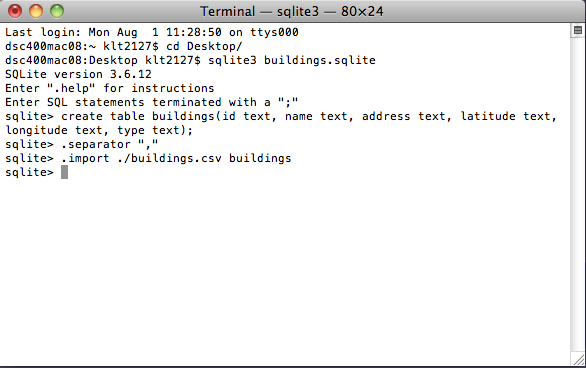
- 2.First select the location where you want save your database file. i choose desktop. then type the command CD Desktop (semicolon ; not require).
- 3. type the command “SQlite3 database_name.sqlite” and press enter. for your understanding purpose i create database name as MyCircle.
ex – SQLite3 MyCircle.sql
*note: you can give extension of your database file as .sql,.sqlite,.db
- 4. after creating the database for using .databases command you can show the list of databases.
ex – .databases;
- 5. after if u create successful database then required to go for create the table for storing and manage the data.
ex. create table Table_Name(field_name1, type, field_name2 type,fild_n type_n); (After writing query must and should semicolon ; required otherwise execution time you get output like…>)
ex. create table Friends(ID integer primary key autoincrement, Name varchar(60), Age int);
*note :- this Friends table belong to MyCircle database.
- 6.After without any error creating table you need for feel the some data in that table then go for insert statement.
ex. insert into table_name values(value1,value2,value_n);
*note :- fill the value as per datatype. if datatype is varchar then require data in single qoute ‘ ‘ where as integer type no required.
ex. insert into Friends values(1,’Nitin’,21);
explanation:- ID is 1, Name type as a varchar then require ‘Nitin’.
SQLite in iOS
iOS using SQLite
- RDBMS(Relational Database Management System)
Relational database systems are used to store user-defined records in large tables.
Features of SQLite.
- 1)Serverless.
SQLite is a serverless does not require a separate server process or system to operate.The SQLite
library accesses its storage files directly.
- 2)Zero Configuration
No server means no setup. Creating an SQLite database instance is as easy as opening a file.
- 3)Cross-Platform
The entire database instance resides in a single cross-platform file, requiring no administration.
- 4)Self-Contained
A single library contains the entire database system, which integrates directly into a host application.
- 5)Small Runtime Footprint
The default build is less than a megabyte of code and requires only a few megabytes of memory. With some adjustments, both the library size and memory use can be significantly reduced.
- 6)Transactional
SQLite transactions are fully ACID-compliant, allowing safe access from multiple processes or threads.
- 7)Highly Reliable
The SQLite development team takes code testing and verification very seriously.
SQLite package the entire database into a single file.That single file contains the database layout as well as the actual data held in all the different tables and indexes and this file format is cross-platfrom and can be accessed on any machine, regardless of native order or word size.
- All SQLite source written in C.
- SQLite database files support the UTF-8, UTF-16LE and UTF16BE encoding.